Rockwell Automation: OptixEdge Advanced Edge Gateway
July 10, 2025
OptixEdge Advanced Edge Gateway: Enhanced Operational Efficiency, Flexibility & Scalability
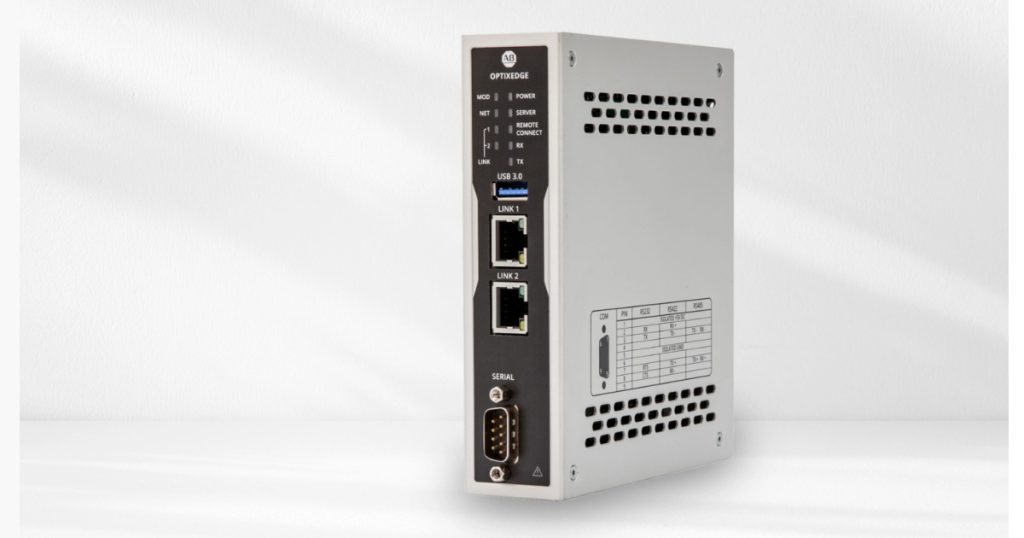
Get the benefits of FactoryTalk Optix and FactoryTalk Remote Access without rearchitecting your automation system. OptixEdge Advanced Edge Gateway features a preloaded wizard to set up connections from your control system to the cloud using MQTT, as well as the option to develop your own application to gather, process and visualize data at the edge. By adding this compact book mount device to your control system, users can set up a secure connectivity to almost any automation network with purpose-built protocol drivers.
Streamlined Data Collection from Various Sources
- Connect to your plant network via the LAN port to collect data from heterogeneous systems
- Interface seamlessly with most common automation protocols
- Exchange data with higher-level systems using the full OPC UA with Companion Specs
- Reduce engineering effort and standardize your solution across different use cases
- Ideal for both new (greenfield) and existing (brownfield) installations, including scenarios where the 1756-EEC module cannot be used
Built-In FactoryTalk Optix Wizard for Cloud-Ready Data Flows
Use the web-based wizard, accessible through any browser, to configure your data flows quickly. Collect real-time data directly from control equipment and integrate to your dashboards and analytics platforms through MQTT, with no additional software required.
Flexibility & Scalability with Docker Containers Support
- Run only what is essential by deploying your own custom applications in isolated Docker containers
- Operate within a secure, closed Linux-based OS to minimize attack surfaces
- Maximize resource efficiency while maintaining the flexibility to adapt or scale as needed
- Enable modular, maintainable solutions that can evolve with your project or plant requirements
Improved Operational Efficiency Through Secure Remote Access
- Remotely commission, program, troubleshoot, or update the OptixEdge and connected devices via the WAN port
- Physically lock the WAN port using a DC input to disable external access when not required
- Connect a DC pilot device or tower light to monitor active remote connections with clear visual indicators
- Establish a secure VPN connection using FactoryTalk Remote Access and Rockwell Automation’s cloud infrastructure
Technical Specifications
| HMI Runtime | FactoryTalk Optix XS size (5 tokens) | FactoryTalk Optix S size (8 tokens) | |
|---|---|---|---|
| HMI Software | Web wizard to easily create your Industrial IoT application | ||
| Remote Assistance SW | FactoryTalk Remote Access Pro | ||
| Other Softwares | 3rd party | Docker containers support | |
| Networking | NAT, NAT1:1, Routing, Internet Sharing * | ||
| Protection Grade IP | IP rating | IP20 | |
| NEMA rating | UL Type 1 (indoor only) | ||
| Case | Installation | DIN rail / Book mounting | |
| Material | Aluminum | ||
| Processor, RAM, Mass Storage | i.MX 8M Plus CPU, 4GB RAM, eMMC in pSLC mode with ~12GB for customer’s application and containers | ||
| Storage Expansion | 1x MicroSD slot on board with external access (push-push) | ||
| Interfaces | LAN | 2x Gigabit Ethernet (RJ45) | |
| USB | 1x USB 3.0 (Type-A / host) | ||
| Serial | 1x RS232/422/485 (DB9M) isolated | ||
| Digital Inputs/Outputs | IN: enable FTRA Network connection, restart Device OUT: FTRA Network connection status, Remote connection status | ||
| Operating Temperature | 0…+50 °C | ||
| Approvals | REACH, RoHS, cULus Listed, WEEE, CE Marked, KC, UKCA Marked, RCM, MOROCCO, ODVA | ||

OptixEdge OptixEdge